 DBeaver
[SQL Editor] How to disable addition extra spaces after autocompletion #11669


-
System information:
Connection specification:
Describe the problem you're observing:
While writing query and select from drop down list I got extra space which I delete every time. Steps to reproduce, if exist:I agree this is useful when I select field name and I at WHERE or at ON condition Include any warning/errors/backtraces from the logs |

Beta Was this translation helpful? Give feedback.
Replies: 13 comments 1 reply

-
|
hI, what database do you use? |
Beta Was this translation helpful? Give feedback.
-
|
PostgreSQL |
Beta Was this translation helpful? Give feedback.
-
|
could you provide a query example? |
Beta Was this translation helpful? Give feedback.
-
|
dbeaver.mp4.zip |
Beta Was this translation helpful? Give feedback.
-
|
unfortunately, the video isn't playable for me. |
Beta Was this translation helpful? Give feedback.
-
|
Video is created by kazam on linux. Probably you lack of some codecs =(. Query example is on first post.
|
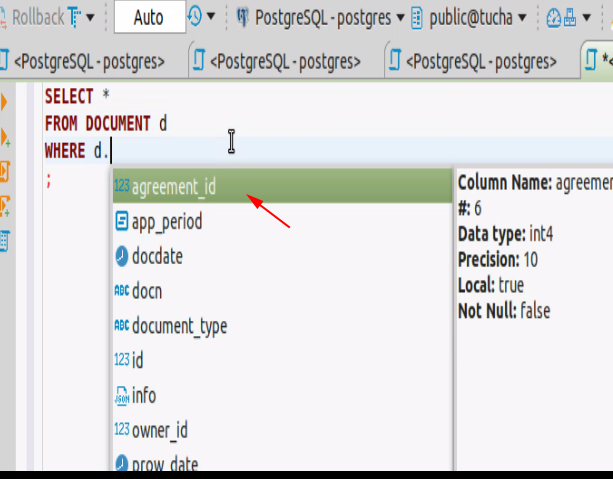
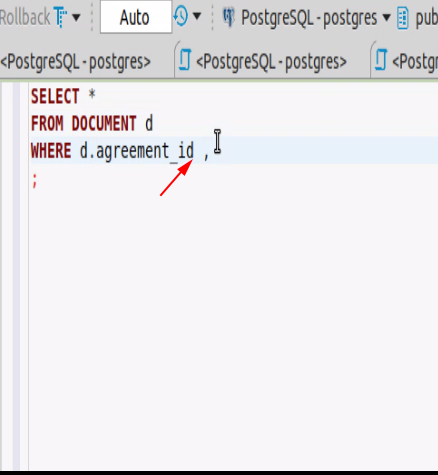
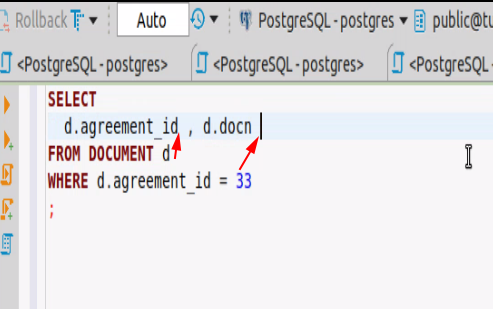
Beta Was this translation helpful? Give feedback.

-
|
Please try to open Properties and go to SQL Editor>Code completion and disable Insert space after table/column names. It should help. |
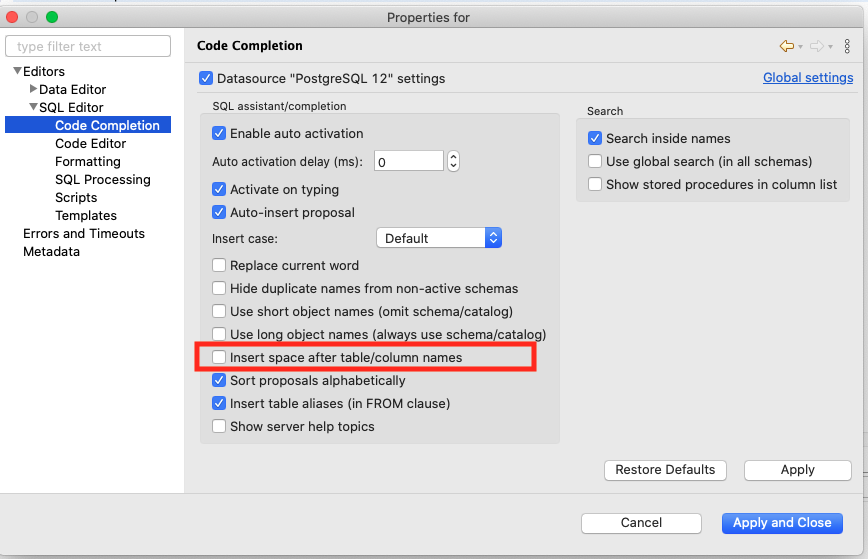
Beta Was this translation helpful? Give feedback.
-
|
Thank you. But now I get vice-verca behaviour: at Space is useful feature but it require improvements |
Beta Was this translation helpful? Give feedback.
-
|
Please give a query example for WHERE |
Beta Was this translation helpful? Give feedback.
-
select id, name                # <<<< example for select
from document d
where d.id = 33 # <<<< example for where |
Beta Was this translation helpful? Give feedback.

-
|
Hello @KES777 |
Beta Was this translation helpful? Give feedback.
-
|
because it looks ugly. For example the one 40Kb query could be executed correct if we write it at one line. But still we split it to many lines for formatting purpose. Here is same it cause me to hit extra buttons to remove extra spaces at wrong place. So if you implement feature it would be good to have it work properly. |
Beta Was this translation helpful? Give feedback.
-
|
Formatting may look unpleasant for you, but be useful for someone else. We added this feature also under user request. As mentioned above, you can disable the setting in the preferences. |
Beta Was this translation helpful? Give feedback.

-
|
It would be nice to have the setting for SELECT column names as well as a setting for other clauses like the WHERE clause... that's what OP was trying to describe. Right now the setting is just for table/column names ANYWHERE in the query. It makes sense to have a space placed after the selected suggested column name in the WHERE clause (because no comma would be used there), but not in the SELECT (because when you specify multiple columns, they will be separated by a comma, but a space then a comma makes no syntactical or aesthetic sense). Example: That's with the setting enabled:
I've never seen any SQL having a space then a comma after each column name in the SELECT clause. So by default, DBeaver's column suggestions don't make sense with SELECT, even if they don't break query functionality. Yes it's an annoyance, but if the option is going to be there for a suggested column, why not have an option to not do it in SELECT?! Or at least not do it in SELECT when the option is enabled; this seems like natural behavior to have. So, I've unchecked my option, because I more often have to specify multiple columns in SELECT than anywhere else. I usually write the queries in DBeaver just for testing purposes, so it's become too annoying to have to keep correcting that before copy-pasting code (which sometimes goes into code, but sometimes goes to other people, you know?). Anyway, that's my two cents. I'm sure DBeaver understands the conundrum. I'd be surprised if people were specifying multiple columns less often in SELECT than anywhere else. |

Beta Was this translation helpful? Give feedback.


Please try to open Properties and go to SQL Editor>Code completion and disable Insert space after table/column names. It should help.