This research project illustrates robotic manipulation through the integration of visual markers, the Azure Kinect DK sensor, and the TIAGo robot. It addresses challenges in marker detection accuracy, robot hand pose estimation, and efficient object manipulation to open and close a drawer. The project showcases real-time algorithm capabilities with improved marker detection and consistent pose predictions. Reducing time execution.
- Build dockerfile (only once)
docker build -t dockerfile . - Build image from dockerfile (only once)
./build.sh - Run container (each time you'll use the container)
./launch_bash.sh
Three main files are available in apriltags_ws/src/apriltag_ros/apriltag_ros/scripts. This files are the ones that allowed to analize the information from the Azure Kinect DK sensor, a visual servoing algorithm, and a simulation.
- apriltag_information_node.cpp : To enhace detection of visual markers.
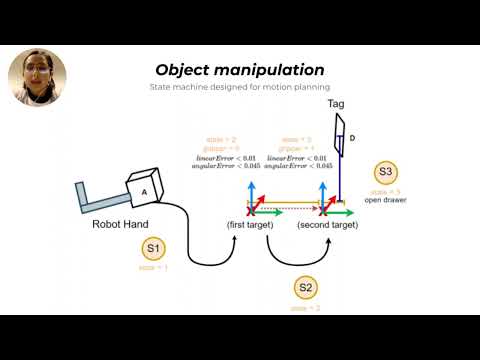
- apriltag_controller_version2.cpp : A visual servoing that controls hand velocity using the robot hand pose, and the target pose.
- apriltag_visualization_node.cpp : A simulation in real time that tracks the current hand pose, and the estimated hand pose.
You must run the following ros nodes:
- Azure Kinect DK node
roslaunch azure_kinect_ros_driver kinect_rgbd.launch - Apriltag information node
Note: The simultion can work just running the Azure Kinect DK node, and the Apriltag information node.
rosrun apriltag_ros apriltag_information_node - Apriltag controller node
rosrun apriltag_ros apriltag_controller
To run the simulation, you must run the following line on the terminal:
rosrun apriltag_ros apriltag_visualization_node
In the following video you can find more information related with the knowledge implemented to develop the algorithm.