In this lab, you'll practice building forms in Sinatra by creating a basketball team sign-up sheet. Your application will have a basic HTML form, and will display the data from the form after it has been submitted by the user.
-
Run
bundle install -
Run
bundle exec shotgun -
Make a form
Create a route that responds to a GET request at
/newteam. Add a form to thenewteam.erbtemplate and render it in the GET/newteamroute.The form should have fields for: Team name ('name') Coach ('coach') Point Guard ('pg') Shooting Guard ('sg') Power Forward ('pf') Small Forward ('sf') Center ('c')
It should look something like this:
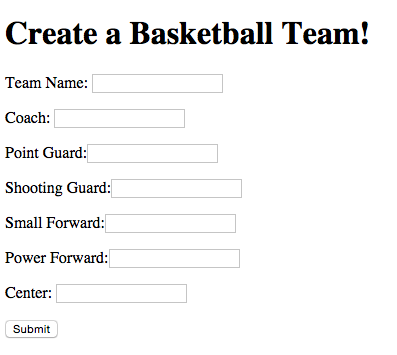
When creating your form, your "Submit" button will need to be identified by an
id attribute attribute with value of "Submit". We're telling this to you now
because our test frame work, Capybara, requires buttons to be
findable by an id, title, or value attribute.
-
Handle form submission
Create a route that responds to a POST request at
/teamHave the form send a POST request to this route. Upon submission, pass the submitted data to theteam.erbtemplate. -
Final Output
Update the
team.erbtemplate so when you post to this form, it displays the name of the team and each member of the team.Your view should display something like this:
-
Deliverables

Pass the tests! Make sure you read the test output carefully!
Please open a GitHub issue or pull-request. Provide a detailed description that explains the issue you have found or the change you are proposing. Then "@" mention your instructor on the issue or pull-request, and send them a link via Connect.
PHRG Sinatra Forms Lab