


A minimalist, cross-platform audiobook player for humans who enjoy audiobooks.
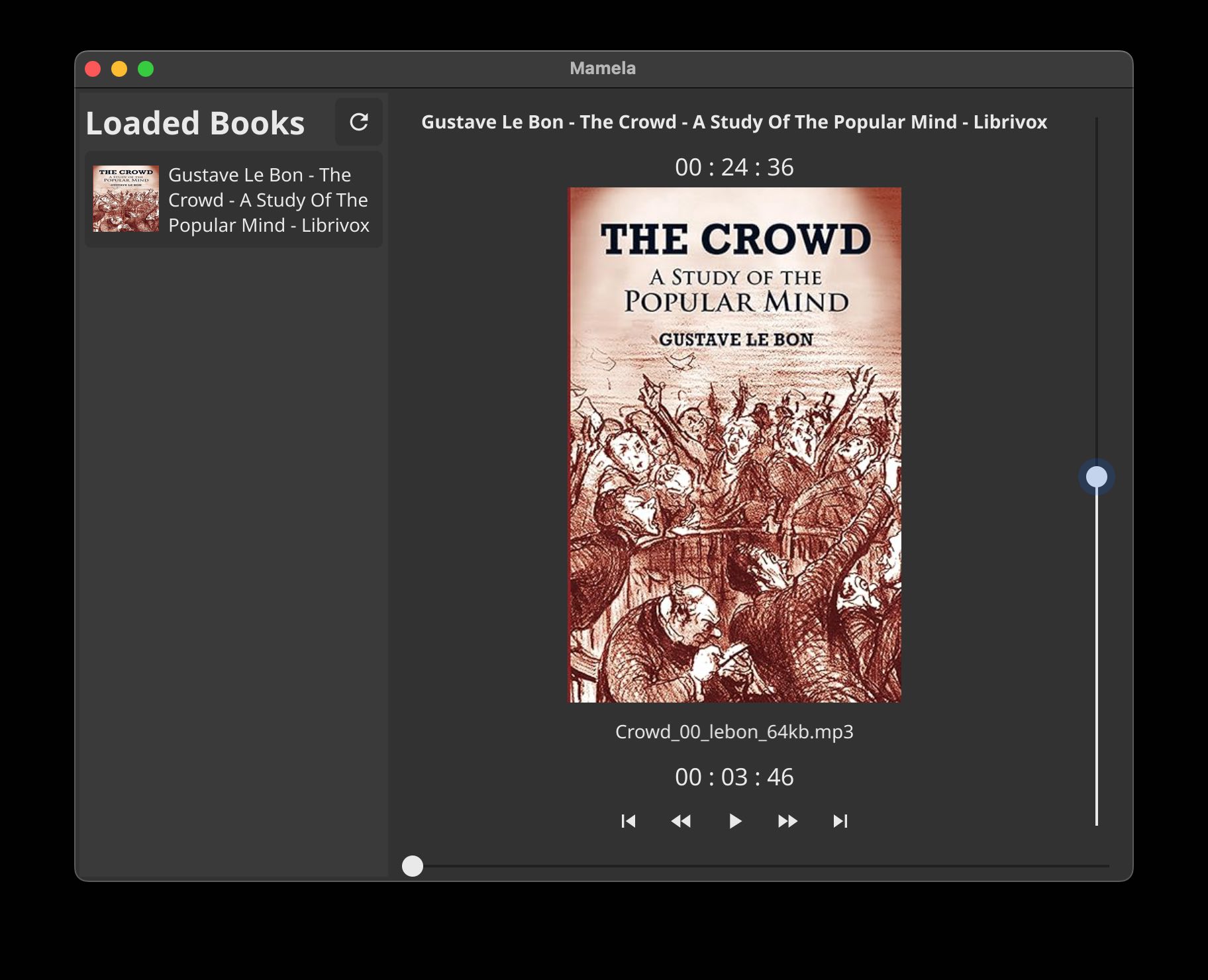
Mamela (Sesotho for “listen”) is a desktop audiobook player written in Go. It gives you a calm, offline-first way to organise folders of audiobooks, resume exactly where you left off, and enjoy rich playback controls on Linux, macOS, and Windows through the Fyne toolkit and the BASS audio engine.
mamela_vid.mp4
- Browse audiobooks by pointing Mamela at a root folder (one sub-folder per book).
- Reads common tag metadata and folder artwork, with graceful fallbacks.
- Remembers listening positions per book, even when files disappear temporarily.
- Marks missing titles without wiping your notes, and lets you delete metadata manually.
- System tray controls plus keyboard shortcuts for quick play, pause, skips, and scrubbing.
- Stores preferences (current book, volume, etc.) in a simple JSON file for easy backup.
| Requirement | Notes |
|---|---|
| Go 1.21+ | Listed in go.mod. CGO must be enabled. |
| Fyne dependencies | Pulled automatically via Go modules (go mod download). |
| BASS native libraries | Bundled in lib/ for macOS (libbass.dylib, libbassopus.dylib), Linux (libbass.so, libbass_aac.so, libbassopus.so), and Windows (bass.dll, bass_aac.dll, bassopus.dll). |
| Toolchain | macOS: Xcode Command Line Tools. Linux: ensure libxxf86vm-dev (and copy the BASS .so libraries to a location on your linker path if required). Windows builds need MinGW or MSVC toolchains that can link CGO code. |
fyne CLI (optional) |
Required only for packaging: go install fyne.io/fyne/v2/cmd/fyne@latest. |
app/             Built binaries live here after running the Makefile targets.
audio/           Audio engine wrapper around BASS (playback, scrubbing, timers).
buildconstraints Platform-specific helpers (path separators, etc.).
storage/         Loads and saves `data.json`, merges metadata, flags missing books.
ui/              Fyne-based interface (book list, controls, system tray, themes).
lib/             Native BASS libraries for each supported platform.
data.json keeps your playback positions, selected root folder, and volume. During development it lives alongside the binary; packaged builds relocate it under a db/ folder within the app bundle.
-
Clone the repository
git clone https://github.com/nkalait/mamela-audiobook-player-open.git cd mamela-audiobook-player-open -
Choose a platform target
The Makefile wraps the necessary CGO linker flags and copies the relevant BASS libraries beside the executable:
Platform Command Output macOS (Intel & Apple silicon) make build_macapp/mamela_audiobook_player-darwinLinux x86_64 make build_linux64app/mamela_audiobook_player_linux64Windows (x86) make build_win86app/mamela_audiobook_player-win86On Linux you may still need to place
libbass.sosomewhere on your runtime linker path (e.g./usr/lib64) and runldconfig. The Makefile comments include extra guidance if the dynamic loader cannot find the library. -
Run the binary
The targets above finish by launching the freshly built executable from the
app/folder. Subsequent runs can be done manually:./app/mamela_audiobook_player-darwin # adjust to match your platform -
Point Mamela at your audiobook library
- Use File → Root Folder to select a directory.
- Each sub-folder within that directory is treated as an audiobook (chapters = audio files).
- Optional artwork placed inside the folder will be picked up automatically.
Mamela writes or updates
data.jsonimmediately. Existing metadata is merged, new titles are appended, and missing ones are flagged rather than deleted.
A pre-packaged version for macOS is available under downloads.
| Platform | Command | Notes |
|---|---|---|
| macOS | make pack_mac |
Produces Mamela.app, copies BASS libraries into Contents/lib/mac, and sets the runtime path. Ensure the fyne CLI is installed first. |
| Linux | make pack_linux64 |
Invokes fyne package -os linux. Further bundling steps are commented in the Makefile if you wish to ship the BASS .so files alongside the binary. |
| Windows | Packaging still a work in progress. |
- Playback controls: Play, pause, fast rewind/forward, skip chapter, and stop are available via buttons, the system tray menu, or keyboard shortcuts (
Space,S, arrow keys). - Scrubbing: Drag the playtime slider to jump forward or backward; the new position is saved to
data.jsonstraight away. - Volume: Adjust via the UI slider or the up/down arrow keys; the level is remembered between sessions.
- Book management:
- Missing folders stay listed and are marked as such, preserving your notes.
- Use the red delete icon to remove an entry from Mamela’s metadata if you really want it gone; the audio files on disk are untouched.
- macOS Sonoma (Intel)
- macOS “Tahoe” (Apple silicon)
- Ubuntu (AMD & ARM)
- Lubuntu (AMD)
- Linux Mint (AMD)
- elementary OS (AMD)
If you try Mamela on another distribution or Windows variant, please report back so we can add it here.
Contributions are heartily encouraged. Bug reports, feature ideas, and pull requests are all welcome:
- Fork the project and create a feature branch.
- Run the formatter (
gofmt) before committing. - Ensure
go build ./...succeeds on at least one platform. - Open a PR describing the change and the motivation behind it.
Not ready to code? Opening an issue with reproduction steps or usability feedback is just as valuable.
- Mamela itself is released under the MIT licence.
- Audio playback relies on BASS. Please review their licensing terms to ensure you are compliant for your use case.
- Icons and interface elements are provided by the Fyne toolkit and the excellent Mamela app icon by Smashicons (flaticon.com).
Happy listening! 🎧